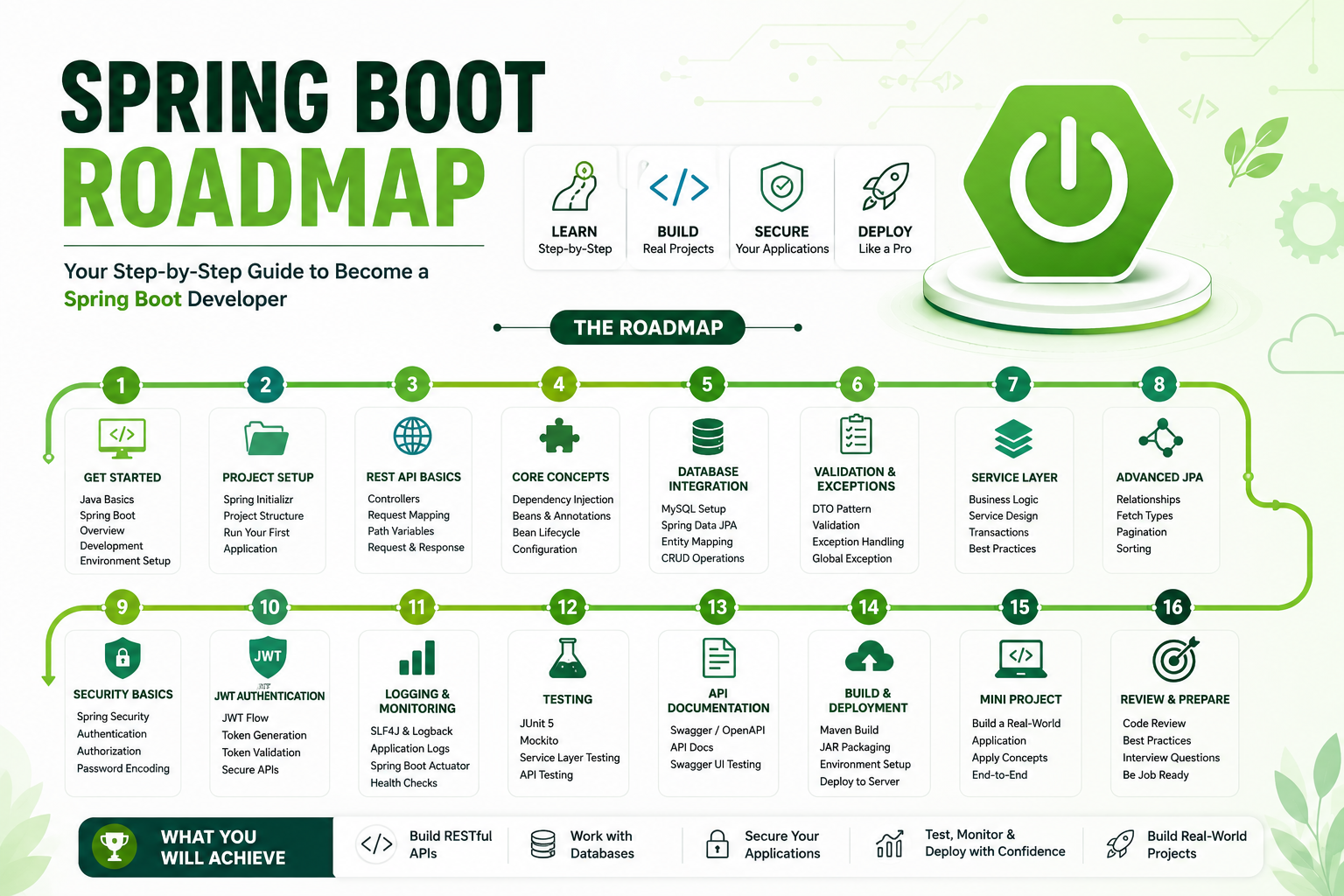
Sr. No. Topic Details Covered 1 Introduction to Java & Spring Boot Java Fundamentals RevisionJDK, JRE, JVMMaven BasicsSpring Framework OverviewSpring Boot Architecture 2 Spring Boot Project Setup Spring InitializrProject Structureapplication.propertiesRunning First Spring Boot Application 3 REST API Development ControllersRequest MappingPath VariablesQuery ParametersRequest BodyResponseEntity 4 Dependency Injection & Bean Management @Component@Service@Repository@AutowiredConstructor InjectionBean Lifecycle 5 Database Integration MySQL SetupSpring Data JPAEntity MappingRepository LayerCRUD Operations 6 DTO & Validation DTO PatternRequest DTOResponse DTOModel MappingBean ValidationException Handling 7 Service Layer & Business Logic Layered ArchitectureService DesignBusiness Logic ImplementationTransaction ManagementBest Practices 8 Advanced JPA Concepts One-to-One MappingOne-to-Many MappingMany-to-One MappingFetch TypesPaginationSorting 9 Security Basics Spring Security IntroductionAuthenticationAuthorizationPassword Encoding 10 JWT Authentication JWT ArchitectureToken GenerationToken ValidationSecuring REST APIs 11 Logging & Monitoring SLF4JLogbackApplication LoggingSpring Boot ActuatorHealth Checks 12 Testing JUnit 5MockitoService Layer TestingController TestingAPI Testing 13 API Documentation Swagger/OpenAPIAPI DocumentationSwagger UI Testing 14 Build & Deployment Maven Build LifecycleJAR PackagingEnvironment ConfigurationLinux Deployment 15 Version Control Git BasicsGit BranchingMerge & Pull RequestsGitHub Workflow 16 Mini Project Development Project SetupDatabase DesignREST API DevelopmentSecurity ImplementationTesting 17 Project Review Code ReviewPerformance ImprovementsBest Practices 18 Interview Preparation Spring Boot Interview QuestionsJPA QuestionsREST API QuestionsMicroservices Overview
Sr. No. Tool / Technology 1 Java 17+ 2 Spring Boot 3 Maven 4 MySQL 5 Spring Data JPA 6 Spring Security 7 JWT 8 Postman 9 Swagger/OpenAPI 10 Git & GitHub 11 VSCode, IntelliJ IDEA / Eclipse
CalcController.java
package com.javatest.demo;

import org.springframework.web.bind.annotation.DeleteMapping;
import org.springframework.web.bind.annotation.GetMapping;
import org.springframework.web.bind.annotation.PostMapping;
import org.springframework.web.bind.annotation.PutMapping;
import org.springframework.web.bind.annotation.RequestBody;
import org.springframework.web.bind.annotation.RequestMapping;
import org.springframework.web.bind.annotation.RequestParam;
import org.springframework.web.bind.annotation.RestController;

class MyCalc {
    private int num1;
    private int num2;

    public int getNum1() {
        return num1;
    }
    public void setNum1(int num1) {
        this.num1 = num1;
    }
    public int getNum2() {
        return num2;
    }
    public void setNum2(int num2) {
        this.num2 = num2;
    }

    @Override
    public String toString() {
        return "MyCalc [num1=" + num1 + ", num2=" + num2 + "]";
    }
}

@RestController
public class CalcController {


    @RequestMapping("test")
    public String test() {
        return "Testing....";
    }

    /** Read query params */
    @RequestMapping("mycalc")
    @GetMapping
    public String getMet(@RequestParam("num1") int x, @RequestParam int y) {
        return String.format("%s + %s = %s", x, y, x+y);
    }

    /** Read raw json data */
    @PostMapping("mycalc")
    public String postMet(@RequestBody MyCalc obj) {
        int x = obj.getNum1();
        int y = obj.getNum2();

        return String.format("%s - %s = %s", x, y, x - y);
    }

    /** Read form data */
    @PutMapping("mycalc")
    public String putMet(
        @RequestParam("num1") int x,
        @RequestParam("num2") int y) {
        return String.format("%s * %s = %s", x, y, x * y);
    }

    /** Read from raw json */
    @DeleteMapping("mycalc")
    public String deleteMet(@RequestBody MyCalc obj) {
        int x = obj.getNum1();
        int y = obj.getNum2();
        return String.format("%s / %s = %s", x, y, x / y);
    }

}
src/main/resources/application.properties
spring.datasource.url=jdbc:mysql://localhost:3306/<databasename>
spring.datasource.username=<username>
spring.datasource.password=<password>
spring.datasource.driverClassName=com.mysql.cj.jdbc.Driver
User.java (POJO/DAO/JPA)
package com.javatest.demo;

import jakarta.persistence.Entity;
import jakarta.persistence.GeneratedValue;
import jakarta.persistence.GenerationType;
import jakarta.persistence.Id;
import jakarta.persistence.Table;

@Entity
@Table(name="users")
public class User {
    @Id
    @GeneratedValue(strategy = GenerationType.IDENTITY)
    private Long id;
    private String name;
    private String age;
    private String city;
    private int quota;

    public Long getId() {
        return id;
    }
    public void setId(Long id) {
        this.id = id;
    }
    public String getName() {
        return name;
    }
    public void setName(String name) {
        this.name = name;
    }
    public String getAge() {
        return age;
    }
    public void setAge(String age) {
        this.age = age;
    }
    public String getCity() {
        return city;
    }
    public void setCity(String city) {
        this.city = city;
    }
    public int getQuota() {
        return quota;
    }
    public void setQuota(int quota) {
        this.quota = quota;
    }


    // getters and setters


}
UserController.java
package com.javatest.demo;


import java.util.List;

import org.springframework.web.bind.annotation.DeleteMapping;
import org.springframework.web.bind.annotation.GetMapping;
import org.springframework.web.bind.annotation.PathVariable;
import org.springframework.web.bind.annotation.PostMapping;
import org.springframework.web.bind.annotation.PutMapping;
import org.springframework.web.bind.annotation.RequestBody;
import org.springframework.web.bind.annotation.RequestMapping;
import org.springframework.web.bind.annotation.RestController;
import org.springframework.data.jpa.repository.JpaRepository;

interface UserRepository extends JpaRepository<User, Long> {
    // Custom queries can be defined here
}

@RestController
@RequestMapping("users")
public class UserController {

    private final UserRepository userRepository;

    public UserController(UserRepository userRepository) {
        this.userRepository = userRepository;
    }

    @RequestMapping("")
    public String index() {
        return "I am from index";
    }

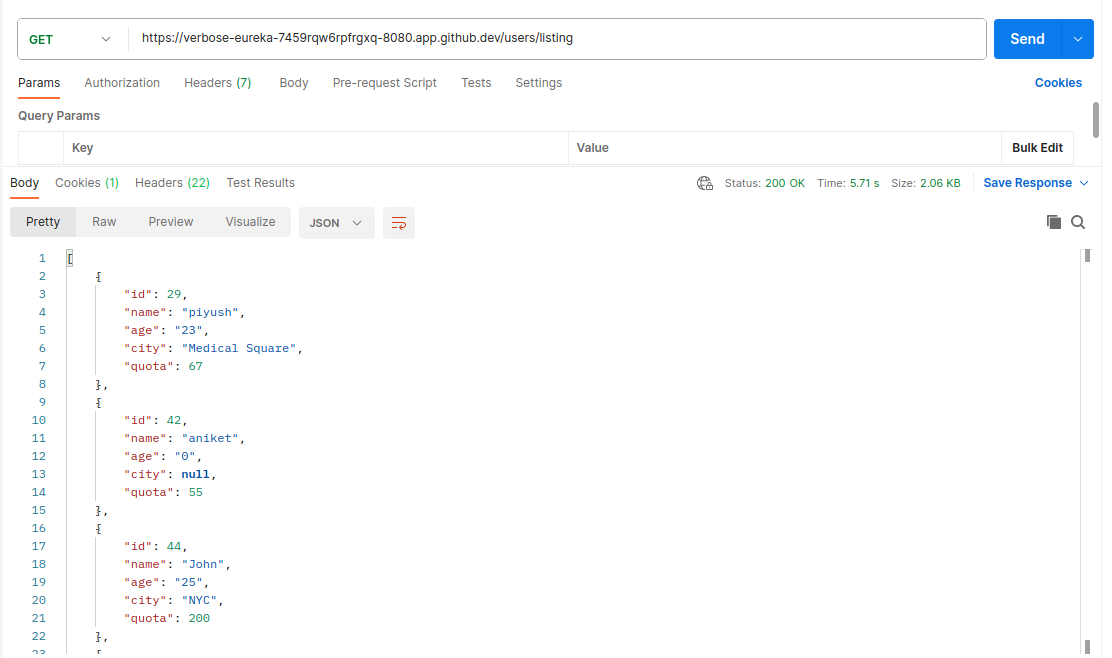
    @RequestMapping("listing")
    public List<User> listing() {
        // List<User> users = new ArrayList<>();
        return userRepository.findAll();
    }

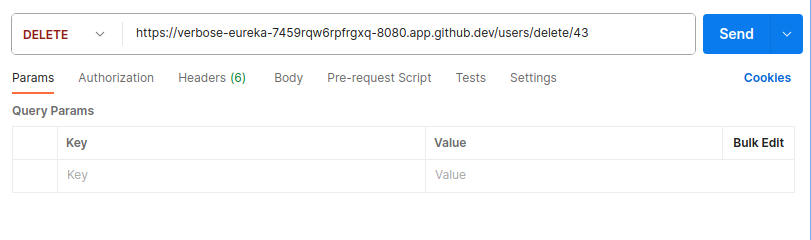
    @DeleteMapping("delete/{id}")
    public String deleteUser(@PathVariable Long id) {
        // Check if the user with the specified ID exists
        if (userRepository.existsById(id)) {
            userRepository.deleteById(id);
            return String.format("User %s is deleted successfully", id);
        } else {
            // Handle the case when the user does not exist (e.g., return an error response)
            // You can throw an exception or return an appropriate response based on your application's requirements.
        }
        return "";
    }

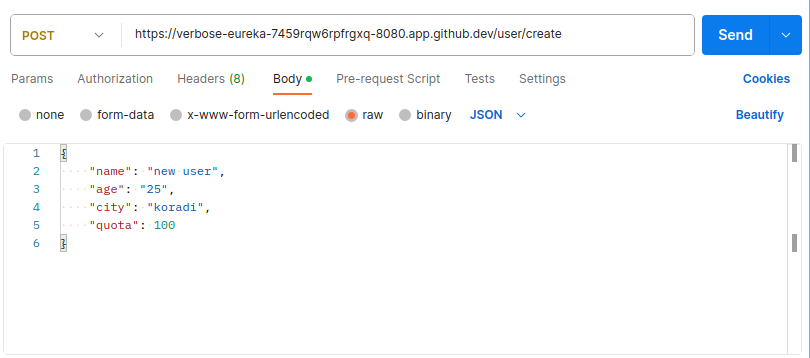
    @PostMapping("create")
    public User createUser(@RequestBody User user) {
        return userRepository.save(user);
    }


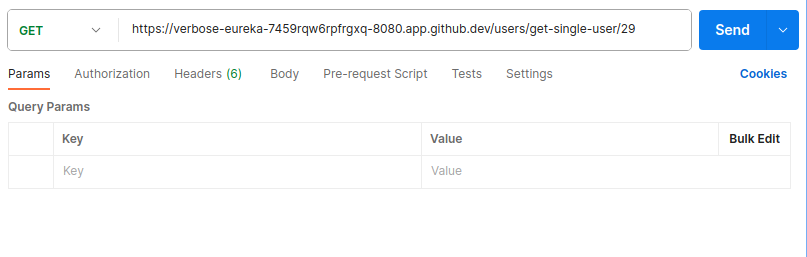
    @GetMapping("get-single/{id}")
    public User getUserById(@PathVariable Long id) {
        // Use the UserRepository to fetch the user by ID
        return userRepository.findById(id).orElse(null);
    }

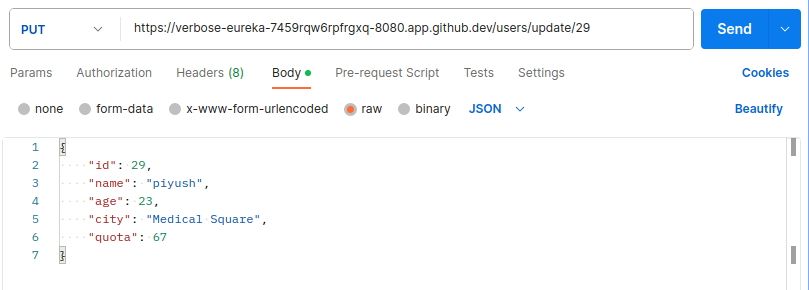
    @PutMapping("/update/{id}")
    public User updateUser(@PathVariable Long id, @RequestBody User updatedUser) {
        // Check if the user with the specified ID exists
        userRepository.findById(id).orElse(null);

        // Set the ID of the updated user to the specified ID
        updatedUser.setId(id);

        // Save the updated user to the database
        return userRepository.save(updatedUser);
    }

}
DemoApplication.java (Run this file to serve spring boot application)
package com.javatest.demo;

import org.springframework.boot.SpringApplication;
import org.springframework.boot.autoconfigure.SpringBootApplication;

@SpringBootApplication
public class DemoApplication {

	public static void main(String[] args) {
		SpringApplication.run(DemoApplication.class, args);
	}

}
File Structure
.
├── HELP.md
├── mvnw
├── mvnw.cmd
├── pom.xml
├── src
│   ├── main
│   │   ├── java
│   │   │   └── com
│   │   │       └── javatest
│   │   │           └── demo
│   │   │               ├── CalcController.java
│   │   │               ├── DemoApplication.java
│   │   │               ├── User.java
│   │   │               └── UserController.java
│   │   └── resources
│   │       ├── application.properties
│   │       ├── static
│   │       └── templates
│   └── test
│       └── java
│           └── com
│               └── javatest
│                   └── demo
│                       └── DemoApplicationTests.java
└── target
    ├── classes
    │   ├── application.properties
    │   └── com
    │       └── javatest
    │           └── demo
    │               ├── CalcController.class
    │               ├── DemoApplication.class
    │               ├── MyCalc.class
    │               ├── User.class
    │               ├── UserController.class
    │               └── UserRepository.class
    └── test-classes
        └── com
            └── javatest
                └── demo
                    └── DemoApplicationTests.class

23 directories, 18 files
POC
VSCode Extesnsions
Spring Boot Web + JPA + MySQL
Got it ✅scratch , step by step, including MySQL dependency so you’re future-ready but you can still just run Hello World without DB config.
🚀 Spring Boot Hello World (with future MySQL support) in VS Code
1. Prerequisites
Check you have these installed:
java -version      # Java 17 or 21 recommended
mvn -v             # Maven installed
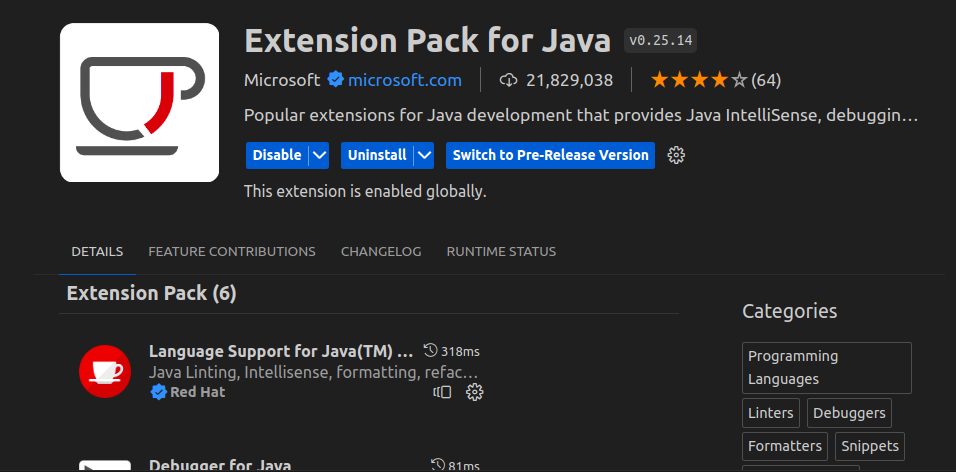
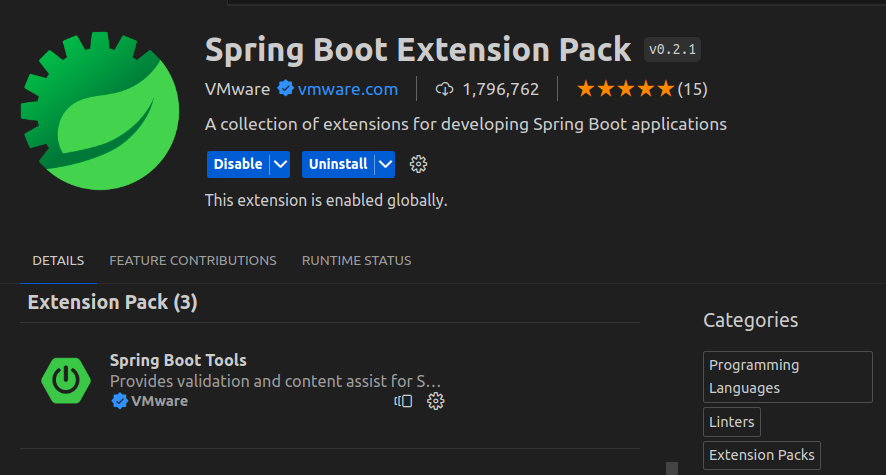
VS Code Extensions:
Extension Pack for Java Spring Boot Extension Pack (optional but helpful)2. Generate Spring Boot Project
Option A (VS Code)
Press Ctrl+Shift+P → search Spring Initializr: Create a Maven Project. Select:Spring Boot version : 3.x (latest)Project : MavenLanguage : JavaGroup Id : com.exampleArtifact Id : helloDependencies : Spring Web, Spring Data JPA, MySQL Driver It will create and open the project in VS Code. Option B (Browser)
Go to 👉 https://start.spring.io
Maven Project , Java, Spring Boot 3.xGroup: com.example Artifact: hello Dependencies: Spring Web, Spring Data JPA, MySQL Driver src/main/resources/application.properties
spring.datasource.url=jdbc:mysql://localhost:3306/your_database
spring.datasource.username=root
spring.datasource.password=your_password

spring.jpa.hibernate.ddl-auto=update
spring.jpa.show-sql=true
spring.jpa.database-platform=org.hibernate.dialect.MySQLDialect
3. Project Structure
You’ll see:
hello/
 ├─ src/main/java/com/example/hello/
 │   ├─ HelloApplication.java
 │   └─ controller/HelloController.java   (we’ll create)
 ├─ src/main/resources/
 │   ├─ application.properties
 ├─ pom.xml
4. Minimal pom.xml
Your pom.xml should contain (important part only):
<dependencies>
    <!-- Spring Web for REST APIs -->
    <dependency>
        <groupId>org.springframework.boot</groupId>
        <artifactId>spring-boot-starter-web</artifactId>
    </dependency>

    <!-- MySQL JDBC Driver -->
    <dependency>
        <groupId>mysql</groupId>
        <artifactId>mysql-connector-j</artifactId>
        <scope>runtime</scope>
    </dependency>

    <!-- JPA (for DB support in future) -->
    <dependency>
        <groupId>org.springframework.boot</groupId>
        <artifactId>spring-boot-starter-data-jpa</artifactId>
    </dependency>

    <!-- Testing -->
    <dependency>
        <groupId>org.springframework.boot</groupId>
        <artifactId>spring-boot-starter-test</artifactId>
        <scope>test</scope>
    </dependency>
</dependencies>
⚡ Even if MySQL is not configured, the app will still run fine.
5. Application Entry Point
Generated file → HelloApplication.java:
package com.example.hello;

import org.springframework.boot.SpringApplication;
import org.springframework.boot.autoconfigure.SpringBootApplication;

@SpringBootApplication
public class HelloApplication {

    public static void main(String[] args) {
        SpringApplication.run(HelloApplication.class, args);
    }
}
6. Create Controller
Create folder controller under com.example.hello.HelloController.java
package com.example.hello.controller;

import org.springframework.web.bind.annotation.GetMapping;
import org.springframework.web.bind.annotation.RestController;

@RestController
public class HelloController {

    @GetMapping("/hello")
    public String hello() {
        return "Hello World";
    }
}
7. Run the Application
In VS Code terminal:
mvn spring-boot:run
Or run HelloApplication.java directly via Run → Start Debugging .
8. Test in Browser / Curl
Visit:
http://localhost:8080/hello
Output:
Hello World
9. (Future) MySQL Connection Setup
When you’re ready to use MySQL, edit src/main/resources/application.properties:
spring.datasource.url=jdbc:mysql://localhost:3306/mydb
spring.datasource.username=root
spring.datasource.password=secret

spring.jpa.hibernate.ddl-auto=update
spring.jpa.show-sql=true
spring.jpa.properties.hibernate.dialect=org.hibernate.dialect.MySQL8Dialect
Then you can create Entity + Repository classes for DB operations.
10. Employee POJO / Repo / Controller
src/main/java/com/example/demo/Employee.java
package com.example.demo;

import jakarta.persistence.*;

@Entity
@Table(name = "employee")
public class Employee {

    @Id
    @GeneratedValue(strategy = GenerationType.IDENTITY)
    private Long id;

    private String name;
    private String department;
    private Double salary;

    // getters & setters
    public Long getId() { return id; }
    public void setId(Long id) { this.id = id; }

    public String getName() { return name; }
    public void setName(String name) { this.name = name; }

    public String getDepartment() { return department; }
    public void setDepartment(String department) { this.department = department; }

    public Double getSalary() { return salary; }
    public void setSalary(Double salary) { this.salary = salary; }

}
src/main/java/com/example/demo/EmployeeRepository.java
package com.example.demo;

import org.springframework.data.jpa.repository.JpaRepository;

public interface EmployeeRepository extends JpaRepository<Employee, Long> {
}
src/main/java/com/example/demo/EmployeeController.java
package com.example.demo;

import org.springframework.web.bind.annotation.*;

import java.util.List;

@CrossOrigin(origins = "*")
@RestController
@RequestMapping("/employees")
public class EmployeeController {

    private final EmployeeRepository employeeRepository;

    public EmployeeController(EmployeeRepository employeeRepository) {
        this.employeeRepository = employeeRepository;
    }

    // ✅ CREATE (POST)
    @PostMapping
    public Employee createEmployee(@RequestBody Employee employee) {
        return employeeRepository.save(employee);
    }

    // ✅ READ ALL (GET)
    @GetMapping
    public List<Employee> getAllEmployees() {
        return employeeRepository.findAll();
    }

    // ✅ READ BY ID (GET)
    @GetMapping("/{id}")
    public Employee getEmployeeById(@PathVariable Long id) {
        return employeeRepository.findById(id).orElse(null);
    }

    // ✅ UPDATE (PUT)
    @PutMapping("/{id}")
    public Employee updateEmployee(
            @PathVariable Long id,
            @RequestBody Employee updatedEmployee) {

        Employee existing = employeeRepository.findById(id).orElse(null);

        if (existing == null) {
            return null;
        }

        existing.setName(updatedEmployee.getName());
        existing.setDepartment(updatedEmployee.getDepartment());
        existing.setSalary(updatedEmployee.getSalary());

        return employeeRepository.save(existing);
    }

    // ✅ DELETE (DELETE)
    @DeleteMapping("/{id}")
    public String deleteEmployee(@PathVariable Long id) {

        if (!employeeRepository.existsById(id)) {
            return "Employee not found";
        }

        employeeRepository.deleteById(id);
        return "Employee deleted successfully";
    }
}
frontend/index.html
<!DOCTYPE html>
<html>
<head>
    <title>Employee CRUD</title>
    <style>
        table {
            border-collapse: collapse;
            width: 70%;
            margin-top: 20px;
        }
        th, td {
            border: 1px solid #333;
            padding: 8px;
        }
        th {
            background-color: #f2f2f2;
        }
        button {
            margin-right: 5px;
        }
        input {
            margin: 5px;
        }
    </style>
</head>
<body>

<h2>Employee Management</h2>

<!-- ADD / EDIT FORM -->
<input type="hidden" id="empId">

<input type="text" id="name" placeholder="Name">
<input type="text" id="department" placeholder="Department">
<input type="number" id="salary" placeholder="Salary">

<button onclick="saveEmployee()">Add / Update</button>

<!-- TABLE -->
<table>
    <thead>
        <tr>
            <th>ID</th>
            <th>Name</th>
            <th>Department</th>
            <th>Salary</th>
            <th>Action</th>
        </tr>
    </thead>
    <tbody id="employeeTable"></tbody>
</table>

<script>
    const apiUrl = "http://localhost:8080/employees";

    function loadEmployees() {
        fetch(apiUrl)
            .then(res => res.json())
            .then(data => {
                const table = document.getElementById("employeeTable");
                table.innerHTML = "";

                data.forEach(emp => {
                    table.innerHTML += `
                        <tr>
                            <td>${emp.id}</td>
                            <td>${emp.name}</td>
                            <td>${emp.department}</td>
                            <td>${emp.salary}</td>
                            <td>
                                <button onclick="editEmployee(${emp.id}, '${emp.name}', '${emp.department}', ${emp.salary})">Edit</button>
                                <button onclick="deleteEmployee(${emp.id})">Delete</button>
                            </td>
                        </tr>
                    `;
                });
            });
    }

    function saveEmployee() {
        const id = document.getElementById("empId").value;
        const employee = {
            name: document.getElementById("name").value,
            department: document.getElementById("department").value,
            salary: document.getElementById("salary").value
        };

        if (id) {
            // UPDATE
            fetch(`${apiUrl}/${id}`, {
                method: "PUT",
                headers: { "Content-Type": "application/json" },
                body: JSON.stringify(employee)
            }).then(() => resetForm());
        } else {
            // CREATE
            fetch(apiUrl, {
                method: "POST",
                headers: { "Content-Type": "application/json" },
                body: JSON.stringify(employee)
            }).then(() => resetForm());
        }
    }

    function editEmployee(id, name, department, salary) {
        document.getElementById("empId").value = id;
        document.getElementById("name").value = name;
        document.getElementById("department").value = department;
        document.getElementById("salary").value = salary;
    }

    function deleteEmployee(id) {
        if (confirm("Are you sure?")) {
            fetch(`${apiUrl}/${id}`, { method: "DELETE" })
                .then(() => loadEmployees());
        }
    }

    function resetForm() {
        document.getElementById("empId").value = "";
        document.getElementById("name").value = "";
        document.getElementById("department").value = "";
        document.getElementById("salary").value = "";
        loadEmployees();
    }

    // Load on page load
    loadEmployees();
</script>

</body>
</html>
✅ That’s it — you now have:
A working Hello World REST API (/hello) MySQL support already included for future use