The “1, 2, 3” cache clear method in Linux refers to clearing different types of caches managed by the operating system. Each cache type is managed differently and cleared by writing a specific value to the file /proc/sys/vm/drop_caches.
Cache Types:
- PageCache (Value:
1):- PageCache stores file contents that are cached in memory to reduce disk I/O.
- Dentries and Inodes (Value:
2):- Dentry is a cache of directory entries, and inodes store file metadata.
- PageCache + Dentries + Inodes (Value:
3):- Clears both PageCache and Dentry/inode caches.
Steps to Clear Cache with Examples:
1. Check Current Memory Usage
Use the free -h command to view current memory and cached memory:
free -h
Look under the “buff/cache” column to see the cache usage.
2. Clear Cache
Use the following commands to clear caches. Root privileges are required, so prefix with sudo:
Clear PageCache:
sudo sh -c "echo 1 > /proc/sys/vm/drop_caches"
Clear Dentry and Inode Cache:
sudo sh -c "echo 2 > /proc/sys/vm/drop_caches"
Clear Both PageCache and Dentry/Inode Cache:
sudo sh -c "echo 3 > /proc/sys/vm/drop_caches"
3. Check Memory Usage Again
Run the free -h command again to verify that the cache has been cleared.
Example Workflow:
- Check Memory Before Clearing:
free -hOutput:total used free shared buff/cache available Mem: 15Gi 4.0Gi 2.0Gi 0.5Gi 9Gi 10Gi Swap: 2Gi 0B 2Gi - Clear All Caches (PageCache, Dentries, and Inodes):
sudo sh -c "echo 3 > /proc/sys/vm/drop_caches" - Check Memory After Clearing:
free -hOutput:total used free shared buff/cache available Mem: 15Gi 4.0Gi 7.0Gi 0.5Gi 4Gi 11Gi Swap: 2Gi 0B 2Gi
Notice how the “buff/cache” column decreases.
Best Practices
- Clearing caches isn’t typically necessary because Linux uses unused memory to cache files and automatically clears it when needed.
- Use this method only for debugging or specific needs (e.g., testing performance under no cache conditions).
Would you like to try this on your system now? Let me know if you need additional help!
Let’s break down PageCache, Dentries, and Inodes with simple explanations and commands you can use on your Ubuntu system to see how they work.
1. PageCache
- What it is:
- PageCache stores file data read from disk in memory to speed up future reads.
- If a file is accessed again, the system reads it from memory instead of the slower disk.
- Example:
- Create a Large File:
dd if=/dev/zero of=testfile bs=1M count=100This creates a filetestfileof 100 MB size. - Clear Cache:
sudo sh -c "echo 3 > /proc/sys/vm/drop_caches" - Read the File (Populates PageCache):
time cat testfile > /dev/nullThe first read is slow because it loads data from disk. - Read the File Again (From PageCache):
time cat testfile > /dev/nullThe second read is faster as it fetches data from memory (PageCache). - Verify Cache Usage: Check memory usage using:
free -h
- Create a Large File:
2. Dentries
- What it is:
- A dentry (directory entry) cache stores metadata about directories, such as filenames and their locations in the filesystem.
- This speeds up directory traversals and file lookups.
- Example:
- Clear Cache:
sudo sh -c "echo 3 > /proc/sys/vm/drop_caches" - List a Large Directory (Populates Dentry Cache):
ls -R /usr > /dev/null - List the Directory Again (From Dentry Cache):
time ls -R /usr > /dev/nullThe second run will be faster because the directory structure is cached in memory.
- Clear Cache:
3. Inodes
- What it is:
- An inode is a data structure storing metadata about a file (e.g., permissions, owner, size).
- Inode caching stores this metadata to reduce disk reads.
- Example:
- Find Inodes Used by the System:
df -iThis shows the inode usage for each mounted filesystem. - Create Many Files (Populates Inode Cache):
mkdir testdir for i in {1..10000}; do touch testdir/file$i; done - Clear Cache:
sudo sh -c "echo 2 > /proc/sys/vm/drop_caches" - List Files (Rebuilds Inode Cache):
time ls testdir > /dev/null - List Files Again (From Inode Cache):
time ls testdir > /dev/nullThe second run will be faster due to inode caching.
- Find Inodes Used by the System:
Summary of Commands:
free -h: Check memory usage (PageCache in “buff/cache”).df -i: Check inode usage for filesystems.echo [1|2|3] > /proc/sys/vm/drop_caches: Clear caches.
The command dd if=/dev/zero of=testfile bs=1M count=100 is a Linux command used to create a file filled with zeros. Here’s a breakdown of each part:
Command Breakdown:
dd:- A low-level command-line utility used for copying and converting data between files or devices.
if=/dev/zero:ifstands for “input file.”/dev/zerois a special file in Linux that produces a continuous stream of null bytes (zeros).
of=testfile:ofstands for “output file.”testfileis the name of the file where the data (zeros) will be written.
bs=1M:bsstands for “block size.”- This sets the size of each block of data to 1 Megabyte (MB).
count=100:- Specifies the number of blocks to copy.
- In this case, 100 blocks of 1 MB each.
What the Command Does:
- It writes 100 MB (1 MB × 100 blocks) of zero-filled data to a file named
testfile.
Example Output:
When you run the command, you’ll see something like this:
100+0 records in
100+0 records out
104857600 bytes (105 MB) copied, 0.123456 s, 847 MB/s
This means:
100+0 records in: 100 blocks read from the input file (/dev/zero).100+0 records out: 100 blocks written to the output file (testfile).104857600 bytes: Total bytes written (100 MB).0.123456 s: Time taken to execute the command.847 MB/s: Write speed.
Verify the File:
- Check the file size:
ls -lh testfileYou should see the size as100 MB. - Inspect the file contents:
hexdump -C testfile | headThis will display the file’s contents in hexadecimal format, and you’ll see it filled with00(zeros).
Why clearing dentries does not affect memory a lot
The behavior you’re observing can be explained by how Linux handles PageCache and Dentries/Inodes caching.
Key Points:
- PageCache (Cleared with
echo 1 > /proc/sys/vm/drop_caches):- Clearing PageCache removes cached file data but does not clear dentries and inodes.
- If you only clear the PageCache, Linux has to read file contents from disk, but dentry and inode information might still be available in memory.
- Dentries and Inodes (Cleared with
echo 2 > /proc/sys/vm/drop_caches):- Clearing dentry and inode caches removes directory structure and file metadata information from memory.
- If dentry and inode caches are cleared, listing directories or performing file operations becomes slower because the system must rebuild this information by reading from disk.
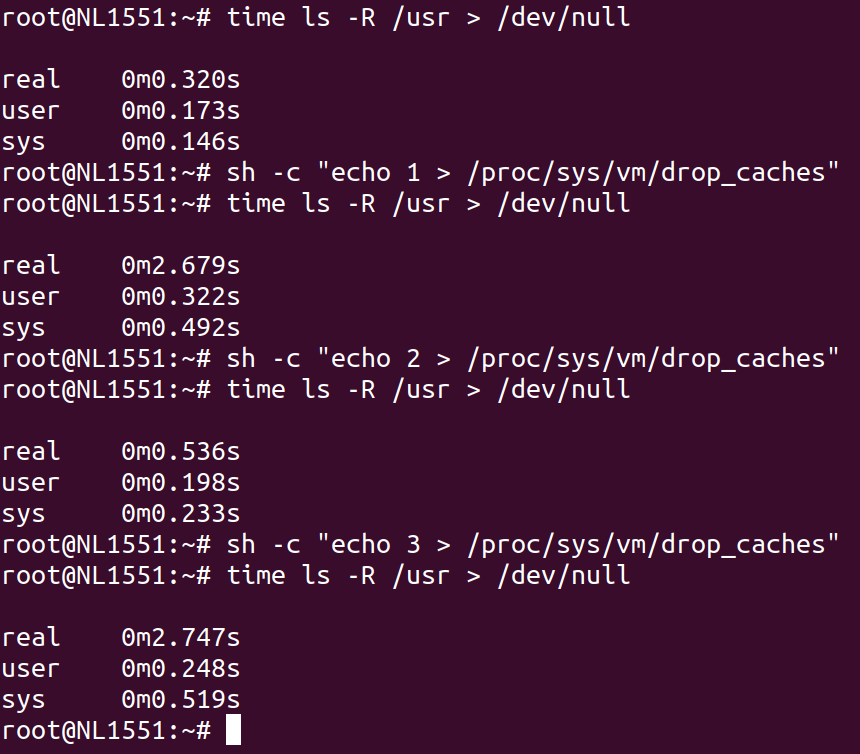
Your Test Results:
- Before Cache Clear:
- The first
ls -Rcommand runs quickly (0.343s) because both PageCache and dentry/inode caches are populated.
- The first
- After Clearing PageCache:
- After running
echo 1 > /proc/sys/vm/drop_caches, the secondls -Rcommand takes significantly longer (2.756s) because:- PageCache is cleared, so file contents must be reloaded from disk.
- However, dentries and inodes are not cleared, so some metadata is still available.
- After running
Why It Still Takes More Time:
The additional time comes from the fact that:
- After clearing the PageCache, the system has to read the file contents (or parts of the directory structure) from disk, which is slower than fetching them from memory.
- Even though dentries and inodes are still in memory, they depend on PageCache for efficient access to file content. So the system has to do extra work to populate the PageCache again.
- Directory traversal involves a combination of file metadata (dentries/inodes) and directory file contents (loaded via PageCache). Clearing just the PageCache impacts this process.
Solution to Test Dentry Cache Impact:
To focus solely on dentry and inode caches, you need to clear them explicitly with:
sh -c "echo 2 > /proc/sys/vm/drop_caches"
Then rerun:
time ls -R /usr > /dev/null
You’ll notice that this run will also take longer compared to when the dentry cache is intact, but the pattern will differ from clearing the PageCache.
Suggested Workflow to Understand All Cache Impacts:
- Baseline:
time ls -R /usr > /dev/null - Clear PageCache:
sh -c "echo 1 > /proc/sys/vm/drop_caches" time ls -R /usr > /dev/null - Clear Dentries and Inodes:
sh -c "echo 2 > /proc/sys/vm/drop_caches" time ls -R /usr > /dev/null - Clear Both PageCache and Dentries/Inodes:
sh -c "echo 3 > /proc/sys/vm/drop_caches" time ls -R /usr > /dev/null
This should give you a clear understanding of how each type of cache contributes to performance.
куплю задвижки 30с41нж задвижка фланцевая 30с41нж
без онлайн фильм корейские фильмы триллеры
the best adult generator turn image into porn video create erotic videos, images, and virtual characters. flexible settings, high quality, instant results, and easy operation right in your browser. the best features for porn generation.
сервис спам рассылок российские сервисы для email рассылки
melbet gratuit pour android telecharger melbet apk
site web 1win gratuit 1win apk
купить квартиру жк светский лес застройщик
Нужен проектор? https://projector24.ru большой выбор моделей для дома, офиса и бизнеса. Проекторы для кино, презентаций и обучения, официальная гарантия, консультации специалистов, гарантия качества и удобные условия покупки.
стоимость химчистки обуви химчистка обуви в москве
Лучшее казино up x официальный сайт играйте в слоты и live-казино без лишних сложностей. Простой вход, удобный интерфейс, стабильная платформа и широкий выбор игр для отдыха и развлечения.
заклепка вытяжная 4 8 заклепка вытяжная
Переходите сюда на ссылка на маркетплейс кракен официальная с ежедневной проверкой
дизайн реальных квартир дизайн квартиры 58 кв м двухкомнатной
https://t.me/ed_1xbet/1000
https://t.me/s/ed_1xbet/847
горячие полотенцесушители купить боковой полотенцесушитель
https://t.me/s/officlal_1win/583
https://t.me/s/officlal_1win/146
clickrank site – Content reads clearly, helpful examples made concepts easy to grasp.
leadnex site – Color palette felt calming, nothing distracting, just focused, thoughtful design.
nicheninja site – Appreciate the typography choices; comfortable spacing improved my reading experience.
reachly site – Content reads clearly, helpful examples made concepts easy to grasp.
leadzo site – Loved the layout today; clean, simple, and genuinely user-friendly overall.
leadora site – Color palette felt calming, nothing distracting, just focused, thoughtful design.
adster – Mobile version looks perfect; no glitches, fast scrolling, crisp text.
reacho – Content reads clearly, helpful examples made concepts easy to grasp.
offerorbit – Overall, professional vibe here; trustworthy, polished, and pleasantly minimal throughout.
promova – Navigation felt smooth, found everything quickly without any confusing steps.
rankora – Bookmarked this immediately, planning to revisit for updates and inspiration.
trendfunnel – Color palette felt calming, nothing distracting, just focused, thoughtful design.
scaleify – Found practical insights today; sharing this article with colleagues later.
For those seeking an exceptional online gaming experience, us.com](https://maxispin.us.com/) stands out as a premier destination. At Maxispin Casino, players can enjoy a vast array of pokies, table games, and other thrilling options, all accessible in both demo and real-money modes. The casino offers attractive bonuses, including free spins and a generous welcome offer, along with cashback promotions and engaging tournaments. To ensure a seamless experience, Maxispin provides various payment methods, efficient withdrawal processes, and reliable customer support through live chat. Security is a top priority, with robust safety measures and a strong focus on responsible gambling tools. Players can easily navigate the site, with detailed guides on account creation, verification, and payment methods. Whether you’re interested in high RTP slots, hold and win pokies, or the latest slot releases, Maxispin Casino delivers a user-friendly and secure platform. Explore their terms and conditions, read reviews, and discover why many consider Maxispin a legitimate and trustworthy choice in Australia.
By leveraging AI technology, MaxiSpin.us.com ensures that your content stands out in a competitive market.
**Features of MaxiSpin.us.com**
MaxiSpin.us.com boasts the ability to generate content in multiple languages as one of its key features.
**Benefits of Using MaxiSpin.us.com**
Both individuals and small businesses can gain significant advantages by using MaxiSpin.us.com.
stackhq – Content reads clearly, helpful examples made concepts easy to grasp.
cloudhq – Navigation felt smooth, found everything quickly without any confusing steps.
bytehq – Bookmarked this immediately, planning to revisit for updates and inspiration.
devopsly – Content reads clearly, helpful examples made concepts easy to grasp.
stackops – Content reads clearly, helpful examples made concepts easy to grasp.
kubeops – Appreciate the typography choices; comfortable spacing improved my reading experience.
cloudopsly – Bookmarked this immediately, planning to revisit for updates and inspiration.
keywordcraft – Appreciate the typography choices; comfortable spacing improved my reading experience.
adscatalyst – Overall, professional vibe here; trustworthy, polished, and pleasantly minimal throughout.
clickrevamp – Bookmarked this immediately, planning to revisit for updates and inspiration.
promoseeder – Content reads clearly, helpful examples made concepts easy to grasp.
serpstudio – Color palette felt calming, nothing distracting, just focused, thoughtful design.
leadspike – Content reads clearly, helpful examples made concepts easy to grasp.
trafficcrafter – Content reads clearly, helpful examples made concepts easy to grasp.
auditpilot – Content reads clearly, helpful examples made concepts easy to grasp.
leadvero – Loved the layout today; clean, simple, and genuinely user-friendly overall.
datadev – Loved the layout today; clean, simple, and genuinely user-friendly overall.
applabs – Pages loaded fast, images appeared sharp, and formatting stayed consistent.
dataops – Color palette felt calming, nothing distracting, just focused, thoughtful design.
trycloudy – Pages loaded fast, images appeared sharp, and formatting stayed consistent.
gobyte – Bookmarked this immediately, planning to revisit for updates and inspiration.
getbyte – Loved the layout today; clean, simple, and genuinely user-friendly overall.
getkube – Mobile version looks perfect; no glitches, fast scrolling, crisp text.
usebyte – Content reads clearly, helpful examples made concepts easy to grasp.
trystack – Color palette felt calming, nothing distracting, just focused, thoughtful design.
usekube – Content reads clearly, helpful examples made concepts easy to grasp.
getstackr – Loved the layout today; clean, simple, and genuinely user-friendly overall.
usestackr – Mobile version looks perfect; no glitches, fast scrolling, crisp text.
cloudster – Found practical insights today; sharing this article with colleagues later.
deployly – Color palette felt calming, nothing distracting, just focused, thoughtful design.
byteworks – Appreciate the typography choices; comfortable spacing improved my reading experience.
stackable – Loved the layout today; clean, simple, and genuinely user-friendly overall.
datavio – Navigation felt smooth, found everything quickly without any confusing steps.
bytevia – Navigation felt smooth, found everything quickly without any confusing steps.
dataworks – Mobile version looks perfect; no glitches, fast scrolling, crisp text.
cryptora – Found practical insights today; sharing this article with colleagues later.
kubexa – Found practical insights today; sharing this article with colleagues later.
cloudiva – Color palette felt calming, nothing distracting, just focused, thoughtful design.
stackora – Appreciate the typography choices; comfortable spacing improved my reading experience.
devonic – Found practical insights today; sharing this article with colleagues later.
apponic – Mobile version looks perfect; no glitches, fast scrolling, crisp text.
codefuse – Content reads clearly, helpful examples made concepts easy to grasp.
securia – Overall, professional vibe here; trustworthy, polished, and pleasantly minimal throughout.
codestackr – Mobile version looks perfect; no glitches, fast scrolling, crisp text.
codepushr – Overall, professional vibe here; trustworthy, polished, and pleasantly minimal throughout.
devpush – Color palette felt calming, nothing distracting, just focused, thoughtful design.
gitpushr – Found practical insights today; sharing this article with colleagues later.
mergekit – Content reads clearly, helpful examples made concepts easy to grasp.
Discover the thrill of real-money live casino action at how to play RNG baccarat for beginners, where you can enjoy live dealers, top software providers, and exclusive promotions.
Frequent updates ensure maxispin-au.com stays current with technology and user input.
shipkit – Mobile version looks perfect; no glitches, fast scrolling, crisp text.
debugkit – Overall, professional vibe here; trustworthy, polished, and pleasantly minimal throughout.
commitkit – Color palette felt calming, nothing distracting, just focused, thoughtful design.
testkit – Mobile version looks perfect; no glitches, fast scrolling, crisp text.
flowbot – Pages loaded fast, images appeared sharp, and formatting stayed consistent.
logkit – Overall, professional vibe here; trustworthy, polished, and pleasantly minimal throughout.
promptkit – Loved the layout today; clean, simple, and genuinely user-friendly overall.
modelops – Pages loaded fast, images appeared sharp, and formatting stayed consistent.
databrain – Loved the layout today; clean, simple, and genuinely user-friendly overall.
mlforge – Found practical insights today; sharing this article with colleagues later.
taskpipe – Mobile version looks perfect; no glitches, fast scrolling, crisp text.
smartpipe – Overall, professional vibe here; trustworthy, polished, and pleasantly minimal throughout.
opsbrain – Bookmarked this immediately, planning to revisit for updates and inspiration.
patchkit – Loved the layout today; clean, simple, and genuinely user-friendly overall.
guardstack – Appreciate the typography choices; comfortable spacing improved my reading experience.
securekit – Pages loaded fast, images appeared sharp, and formatting stayed consistent.
authkit – Found practical insights today; sharing this article with colleagues later.
pipelinesy – Color palette felt calming, nothing distracting, just focused, thoughtful design.
zerotrusty – Bookmarked this immediately, planning to revisit for updates and inspiration.
keyvaulty – Found practical insights today; sharing this article with colleagues later.
shieldops – Overall, professional vibe here; trustworthy, polished, and pleasantly minimal throughout.
secstackr – Loved the layout today; clean, simple, and genuinely user-friendly overall.
smartbyte – Overall, professional vibe here; trustworthy, polished, and pleasantly minimal throughout.
cyberstack – Navigation felt smooth, found everything quickly without any confusing steps.
nanotechhub – Appreciate the typography choices; comfortable spacing improved my reading experience.
techvertex – Found practical insights today; sharing this article with colleagues later.
pixelengine – Mobile version looks perfect; no glitches, fast scrolling, crisp text.