To get the connection string
Atlas > Deployment > Databases > Connect > Connect your application > Driver Node.js > Version 4.1 or later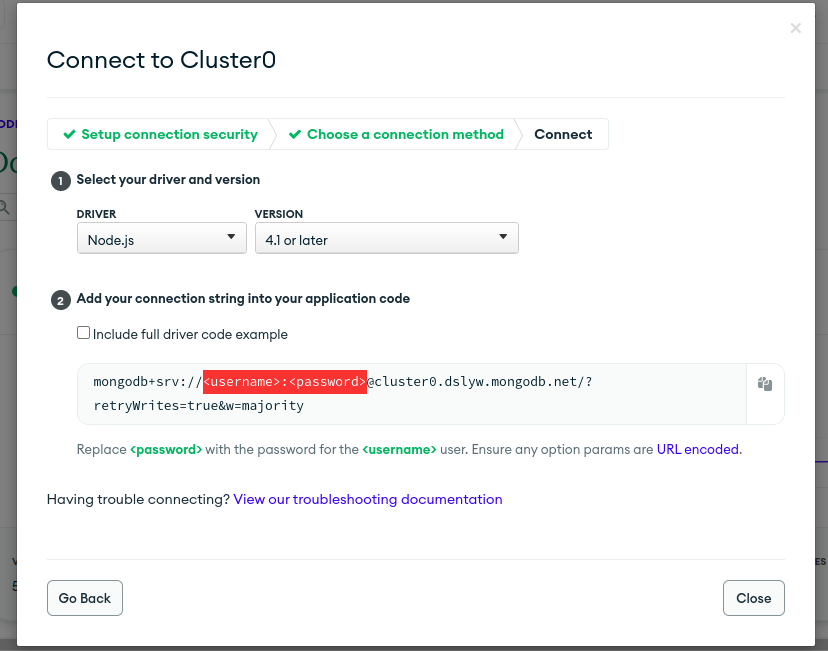
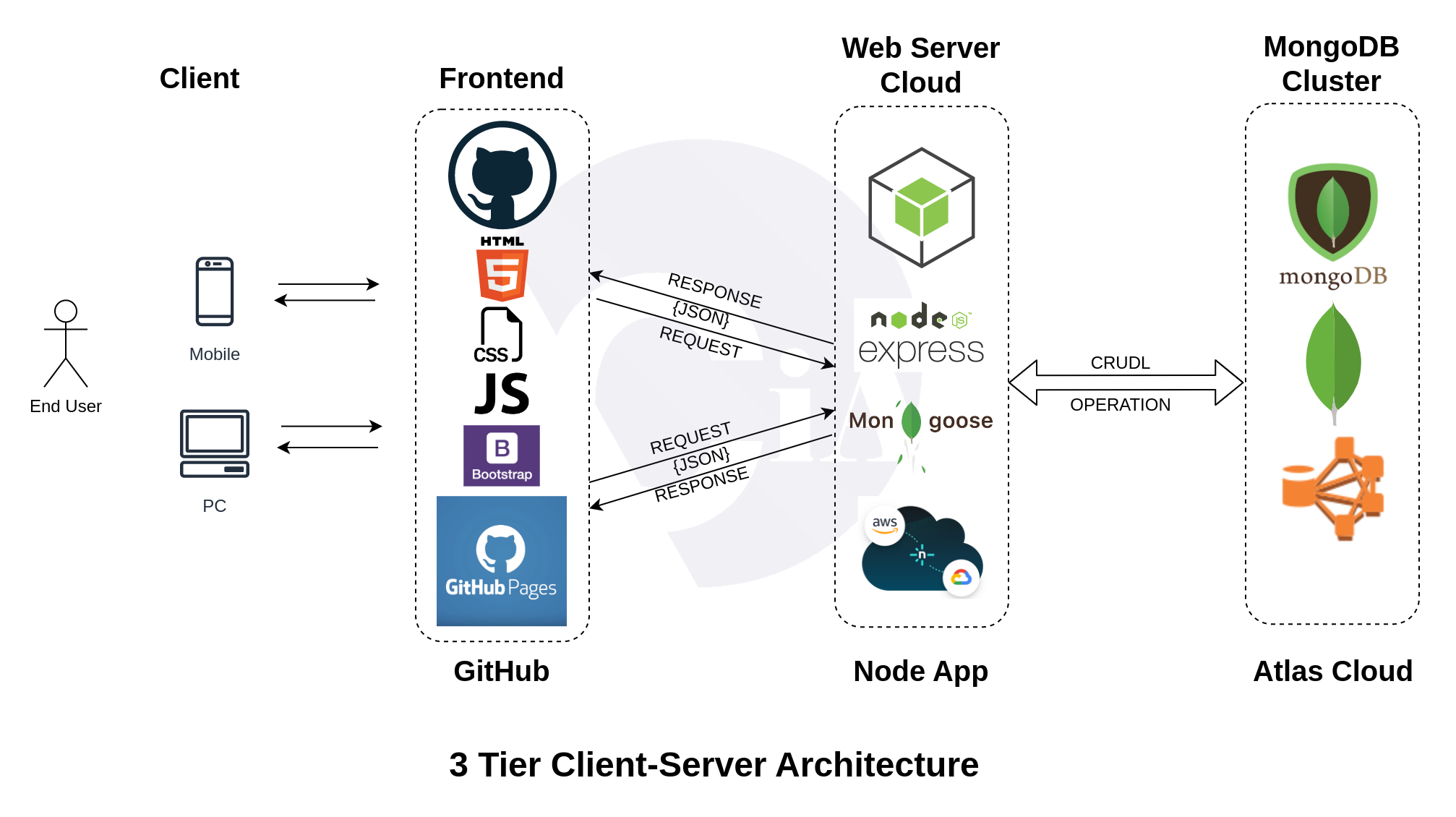
CRUD Application using Vanilla JS | HTML5 | CSS3 | Bootstrap5
NOTE: DON’T FORGET TO APPEND DATABASE NAME IN CONNECTION STRING URL
users_module.js
//Step 1: Database connection using connection string
const mongoose = require("mongoose");

//mongodb://127.0.0.1:27017/dbname
//const conn_str = "mongodb://localhost:27017/tcet";
const conn_str = "mongodb+srv://user:passwd@cluster0.gp5lcta.mongodb.net/<DBNAME>?retryWrites=true&w=majority"

mongoose.connect(conn_str, { useNewUrlParser: true, useUnifiedTopology: true })
	.then(() => console.log("Connected successfully..."))
	.catch( (error) => console.log(error) );


//Step 2: Create Schema (similar to Java Class)
const userSchema = new mongoose.Schema({
	name: String,
	age: Number,
	city: String
})

//Step 3: Create collection Object (model)
// MAPPING
const userObject = new mongoose.model("users", userSchema);

exports.User = userObject;
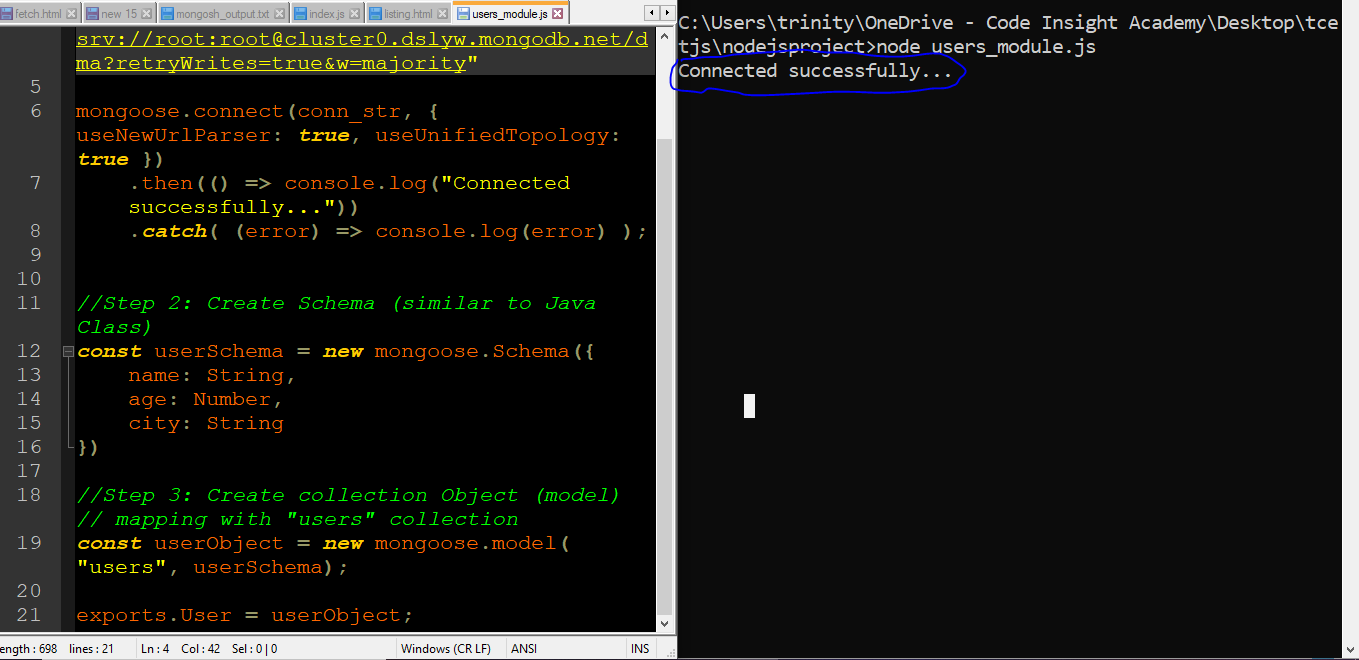
Test Database Connection
index.js
const express = require("express");
const port = 8080;

const user_model = require("./users_module");
const User = user_model.User;

const app = express();
app.use(express.json());

var cors = require('cors');
app.use(cors());

app.get("/", (req, res) => {
	res.send("Hello Friends..");
});

app.get("/user", async (req, res) => {
	let data = await User.find().sort({_id:-1});
	res.send(data);
});

app.get("/user/:id", async (req, res) => {
	console.log(req.params.id);
	let data = await User.find({"_id": req.params.id});
	res.send(data[0]);
});

app.post("/user", async (req, res) => {
	console.log(req.body)
	let u = await User(req.body);
	let result = u.save();
	res.send(req.body);
});

app.put("/user", async (req, res) => {
	console.log(req.body);

	//User.updateOne({where}, {set});
	let u_data = await User.updateOne({"_id": req.body._id}, {
		"$set": {
			"name" : req.body.name,
			"age" : req.body.age,
			"city" : req.body.city
		}
	});

	res.send(u_data);
});

app.delete("/user", async(req, res) => {

	let d_data = await User.deleteOne({"_id": req.body._id});
	res.send(d_data);
});

app.listen(process.env.PORT || port, () => {
	console.log(`Listening on port ${port}`);
});
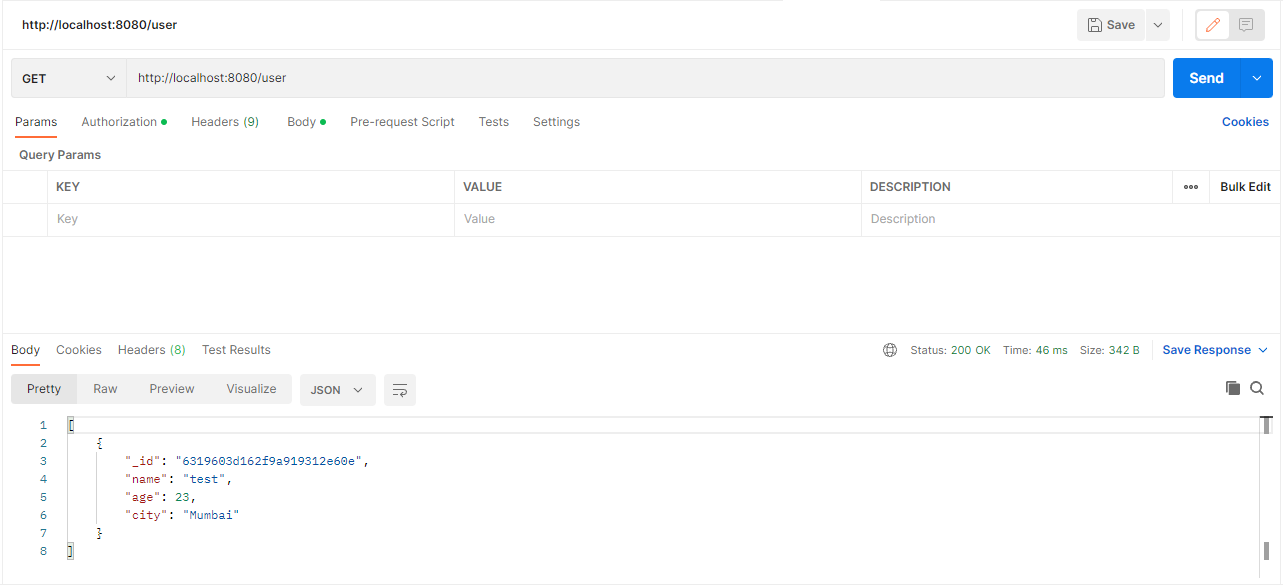
Run index.js file (node .) and Test in Postman
GET Method
POST Method
POST Method
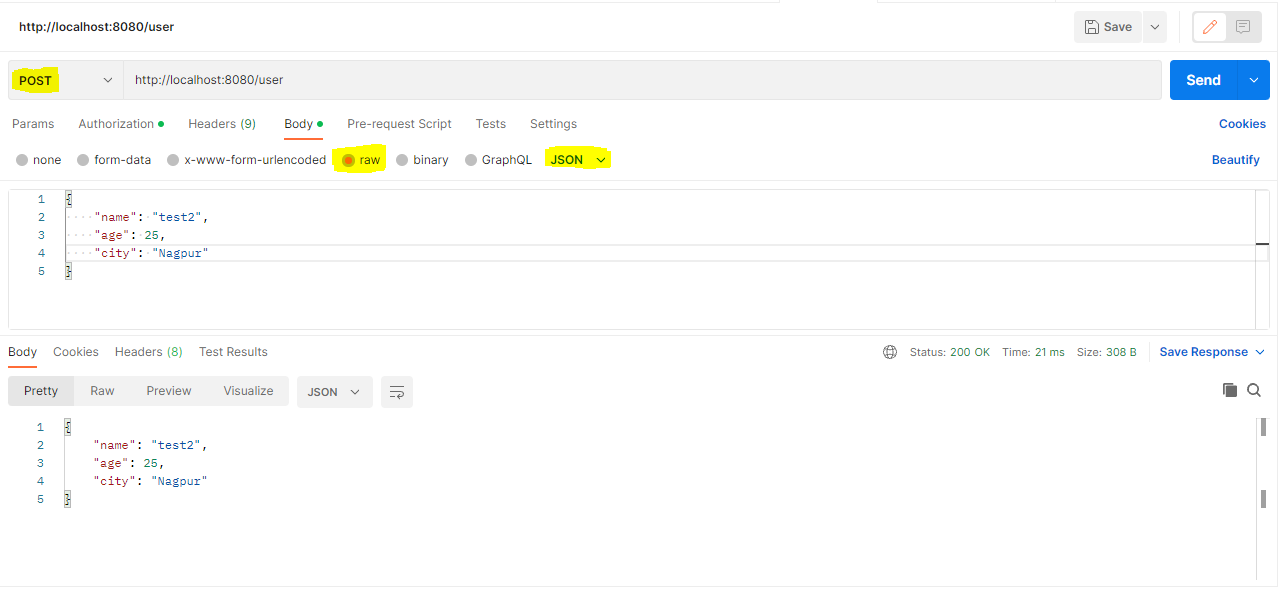
PUT Method

DELETE Method
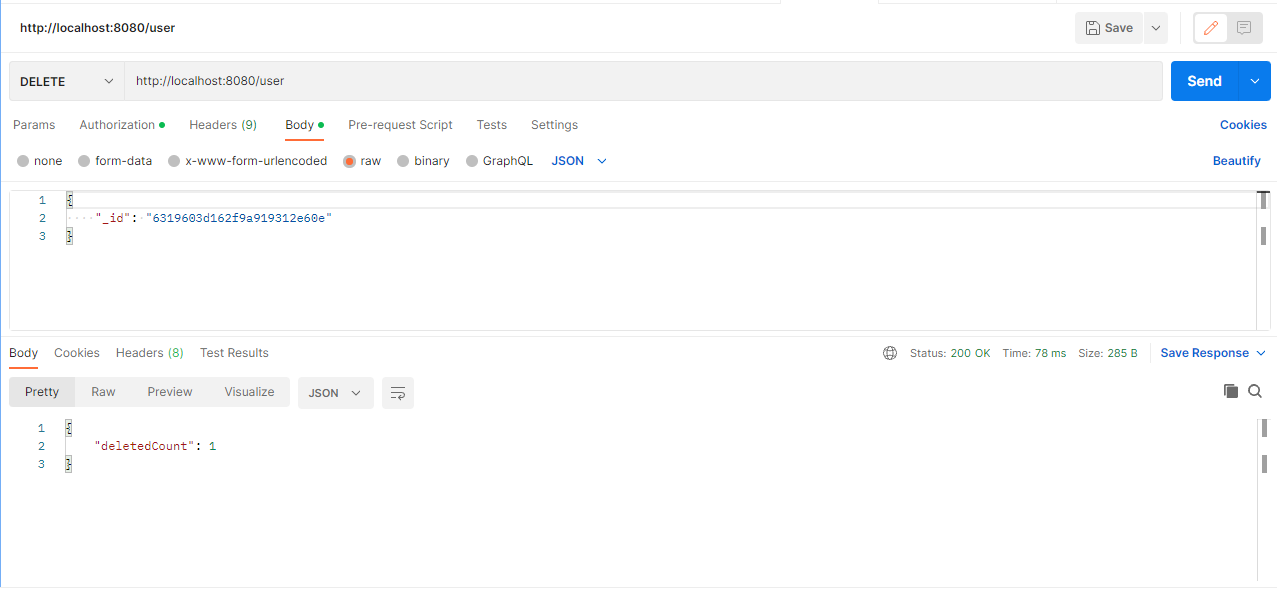
Create Frontend to access all web services from Web Browser
script.js
//const api_url = "<heroku_app_url>"
const api_url = "http://localhost:8080/user"
function loadData(records = []) {
var table_data = "";
for(let i=0; i<records.length; i++) {
table_data += `<tr>`;
table_data += `<td>${records[i].name}</td>`;
table_data += `<td>${records[i].age}</td>`;
table_data += `<td>${records[i].city}</td>`;
table_data += `<td>`;
table_data += `<a href="edit.html?id=${records[i]._id}"><button class="btn btn-primary">Edit</button></a>`;
table_data += ' ';
table_data += `<button class="btn btn-danger" onclick=deleteData('${records[i]._id}')>Delete</button>`;
table_data += `</td>`;
table_data += `</tr>`;
}
//console.log(table_data);
document.getElementById("tbody").innerHTML = table_data;
}
function getData() {
fetch(api_url)
.then((response) => response.json())
.then((data) => {
console.table(data);
loadData(data);
});
}
function getDataById(id) {
fetch(`${api_url}/${id}`)
.then((response) => response.json())
.then((data) => {
console.log(data);
document.getElementById("id").value = data._id;
document.getElementById("name").value = data.name;
document.getElementById("age").value = data.age;
document.getElementById("city").value = data.city;
})
}
function postData() {
var name = document.getElementById("name").value;
var age = document.getElementById("age").value;
var city = document.getElementById("city").value;
data = {name: name, age: age, city: city};
fetch(api_url, {
method: "POST",
headers: {
'Accept': 'application/json',
'Content-Type': 'application/json'
},
body: JSON.stringify(data)
})
.then((response) => response.json())
.then((data) => {
console.log(data);
window.location.href = "index.html";
})
}
function putData() {
var _id = document.getElementById("id").value;
var name = document.getElementById("name").value;
var age = document.getElementById("age").value;
var city = document.getElementById("city").value;
data = {_id: _id, name: name, age: age, city: city};
fetch(api_url, {
method: "PUT",
headers: {
'Accept': 'application/json',
'Content-Type': 'application/json'
},
body: JSON.stringify(data)
})
.then((response) => response.json())
.then((data) => {
console.table(data);
window.location.href = "index.html";
})
}
function deleteData(id) {
user_input = confirm("Are you sure you want to delete this record?");
if(user_input) {
fetch(api_url, {
method: "DELETE",
headers: {
'Accept': 'application/json',
'Content-Type': 'application/json'
},
body: JSON.stringify({"_id": id})
})
.then((response) => response.json())
.then((data) => {
console.log(data);
window.location.reload();
})
}
}index.html
<!DOCTYPE html>
<html>
<head>
<title>CIA Institute - MongoDB Project</title>
<link href="https://cdn.jsdelivr.net/npm/bootstrap@5.0.2/dist/css/bootstrap.min.css" rel="stylesheet" crossorigin="anonymous">
<script src="https://cdn.jsdelivr.net/npm/bootstrap@5.0.2/dist/js/bootstrap.bundle.min.js"crossorigin="anonymous"></script>
</head>
<body class="d-flex flex-column h-100 container">
<header>
<nav class="navbar navbar-expand-lg navbar-expand-sm navbar-light bg-light">
<div class="container-fluid">
<div class="collapse navbar-collapse" id="navbarNavAltMarkup">
<div class="navbar-nav">
<a class="nav-link active" aria-current="page" href="#">Listing</a>
<a class="nav-link" href="add.html">Add New</a>
</div>
</div>
</div>
</nav>
</header>
<table class="table table-striped table-hover text-center">
<thead>
<th>Name</th>
<th>Age</th>
<th>City</th>
<th>Action</th>
</thead>
<tbody id="tbody">
</tbody>
<tfoot>
</tfoot>
</table>
<footer class="footer mt-auto py-3 bg-light">
<div class="container text-center">
<span class="text-muted"> © CIA Institute 2022</span>
</div>
</footer>
</body>
<script src="script.js"></script>
<script>
getData();
</script>
</html>Test in Browser
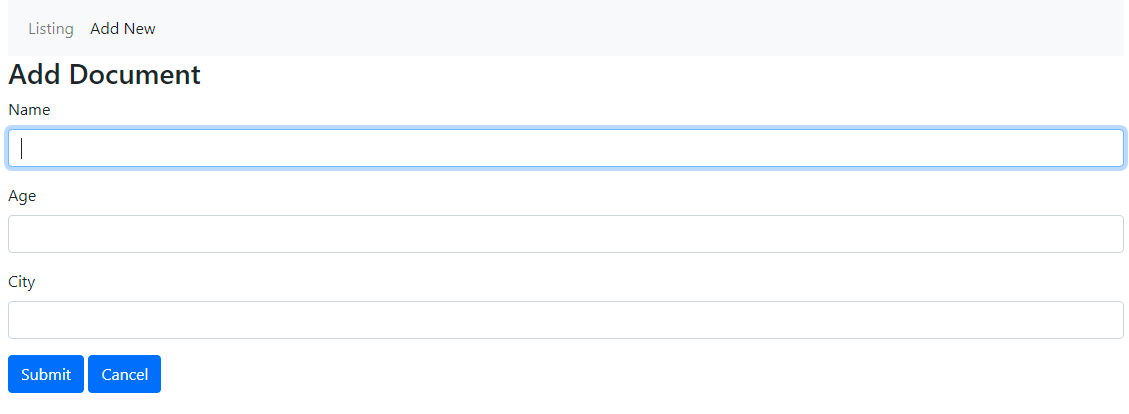
add.html
<html>
<head>
<title>CIA Institute - MongoDB Project</title>
<link href="https://cdn.jsdelivr.net/npm/bootstrap@5.0.2/dist/css/bootstrap.min.css" rel="stylesheet" crossorigin="anonymous">
<script src="https://cdn.jsdelivr.net/npm/bootstrap@5.0.2/dist/js/bootstrap.bundle.min.js"crossorigin="anonymous"></script>
</head>
<body class="d-flex flex-column h-100 container">
<header>
<nav class="navbar navbar-expand-lg navbar-expand-sm navbar-light bg-light">
<div class="container-fluid">
<div class="collapse navbar-collapse" id="navbarNavAltMarkup">
<div class="navbar-nav">
<a class="nav-link" href="index.html">Listing</a>
<a class="nav-link active" aria-current="page" href="add.html">Add New</a>
</div>
</div>
</div>
</nav>
</header>
<h3>Add Document</h3>
<form onsubmit="return false;">
<div class="mb-3">
<label for="name" class="form-label">Name</label>
<input type="text" class="form-control" id="name" autofocus>
</div>
<div class="mb-3">
<label for="exampleInputPassword1" class="form-label">Age</label>
<input type="text" class="form-control" id="age">
</div>
<div class="mb-3">
<label for="city" class="form-label">City</label>
<input type="text" class="form-control" id="city">
</div>
<button class="btn btn-primary" onclick="return postData()">Submit</button>
<a href="index.html" class="btn btn-primary">Cancel</a>
</form>
<footer class="footer mt-auto py-3 bg-light">
<div class="container text-center">
<span class="text-muted"> © CIA Institute 2022</span>
</div>
</footer>
</body>
<script src="script.js"></script>
<script>
</script>
</html>edit.html
<html>
<head>
<title>CIA Institute - MongoDB Project</title>
<link href="https://cdn.jsdelivr.net/npm/bootstrap@5.0.2/dist/css/bootstrap.min.css" rel="stylesheet" crossorigin="anonymous">
<script src="https://cdn.jsdelivr.net/npm/bootstrap@5.0.2/dist/js/bootstrap.bundle.min.js"crossorigin="anonymous"></script>
</head>
<body class="d-flex flex-column h-100 container">
<header>
<nav class="navbar navbar-expand-lg navbar-expand-sm navbar-light bg-light">
<div class="container-fluid">
<div class="collapse navbar-collapse" id="navbarNavAltMarkup">
<div class="navbar-nav">
<a class="nav-link" href="index.html">Listing</a>
<a class="nav-link active" aria-current="page" href="add.html">Add New</a>
</div>
</div>
</div>
</nav>
</header>
<h3>Edit Document</h3>
<form onsubmit="return false;">
<input type="hidden" class="form-control" id="id">
<div class="mb-3">
<label for="name" class="form-label">Name</label>
<input type="text" class="form-control" id="name" autofocus>
</div>
<div class="mb-3">
<label for="exampleInputPassword1" class="form-label">Age</label>
<input type="text" class="form-control" id="age">
</div>
<div class="mb-3">
<label for="city" class="form-label">City</label>
<input type="text" class="form-control" id="city">
</div>
<button class="btn btn-primary" onclick="return putData()">Update</button>
<a href="index.html" class="btn btn-primary">Cancel</a>
</form>
<footer class="footer mt-auto py-3 bg-light">
<div class="container text-center">
<span class="text-muted"> © CIA Institute 2022</span>
</div>
</footer>
</body>
<script src="script.js"></script>
<script>
const urlParams = new URLSearchParams(window.location.search);
const id = urlParams.get('id');
getDataById(id);
</script>
</html>Screenshots
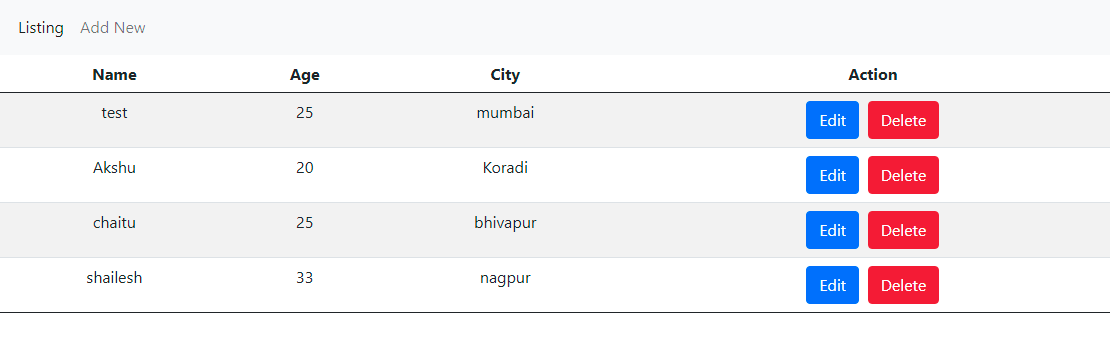
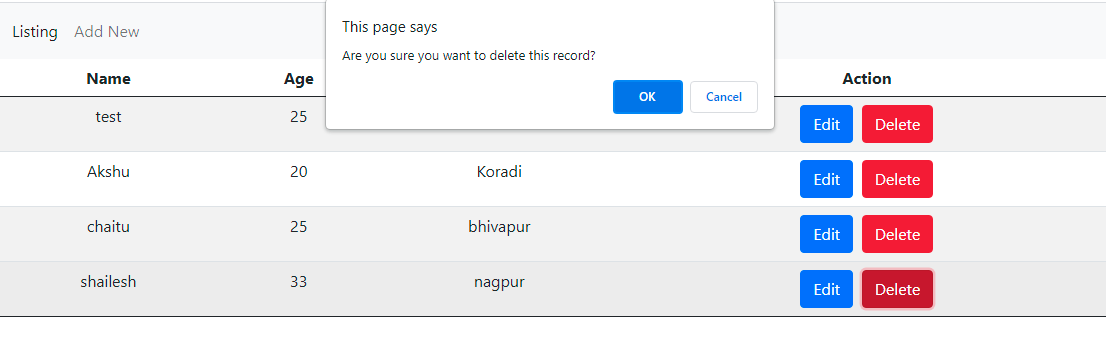

Reference Link: https://gitlab.com/tcet/mongodb-july-21.git
Create REST Api using Node.js | Express | Mongoose
index.js
const port = 8080;
const mongoose = require("mongoose");
//const conn_str ="C"
const conn_str = "mongodb://<user>:<passwd>@cluster0-shard-00-00.dslyw.mongodb.net:27017,cluster0-shard-00-01.dslyw.mongodb.net:27017,cluster0-shard-00-02.dslyw.mongodb.net:27017/<databasename>?ssl=true&replicaSet=atlas-3xk2hf-shard-0&authSource=admin&retryWrites=true&w=majority";


mongoose.connect(conn_str, { useNewUrlParser: true , useUnifiedTopology: true})
	.then( () => console.log("Connected successfully...") )
	.catch( (err) => console.log(err) );


const userSchema = new mongoose.Schema({
	name: String,
	age: Number,
	city: String
});

const user = new mongoose.model("users", userSchema);


/** Express Mongoose Integration **/

const express = require("express");
var cors = require('cors');
const app = express();


//add middlewares
app.use(express.json());
app.use(cors());


app.route("/user")
.get(async (req, res) => {
	let data = await user.find();
	res.send(data);
})
.post(async (req, res) => {
	req_data = req.query;
	let obj = new user(req.query)
	let result = await obj.save();
	res.send(result);
})
.put(async (req, res) => {
	console.log(req.body);

	//model.updateOne({where}, {set});
	let u_data = await user.updateOne({"_id": req.body._id}, {
		"$set": {
			"name" : req.body.name,
			"age" : req.body.age,
			"city" : req.body.city
		}
	});

	res.send(u_data);
})
.delete(async (req, res) => {
	let d_data = await User.deleteOne({"_id": req.body._id});
	res.send(d_data);
})


app.listen(process.env.PORT || port, () => {
	console.log("listening 8080...");
});
Call REST Api using Vanilla JS
index.html
<script>
function getDataById(id) {
	fetch(`http://localhost:8080/user/${id}`)
	.then((response) => response.json())
	.then((data) => { console.table(data); })
}

function getData() {
	fetch("http://localhost:8080/user")
	.then((response) => response.json())
	.then((data) => { console.table(data); })
}

function postData(data) {
	fetch("http://localhost:8080/user", {
		method: "POST",
		headers: {
		  'Accept': 'application/json',
		  'Content-Type': 'application/json'
		},
		body: JSON.stringify(data)
	})
	.then((response) => response.json())
	.then((data) => { console.table(data); })
}


function putData(data) {
	fetch("http://localhost:8080/user", {
		method: "PUT",
		headers: {
		  'Accept': 'application/json',
		  'Content-Type': 'application/json'
		},
		body: JSON.stringify(data)
	})
	.then((response) => response.json())
	.then((data) => { console.table(data); })
}

function deleteData(id) {
	fetch("http://localhost:8080/user", {
		method: "DELETE",
		headers: {
		  'Accept': 'application/json',
		  'Content-Type': 'application/json'
		},
		body: JSON.stringify({"_id": id})
	})
	.then((response) => response.json())
	.then((data) => { console.table(data); })
}


getDataById();
getData();
postData({"name": "Akshu", "age": 20, "city": "Koradi"});
putData({"_id" : "61082ae9cd4b7a0ccc39d377", "name": "chaitu"});
deleteData("61082b4ecd4b7a0ccc39d37a");
</script>
Я восхищен этой статьей! Она не только предоставляет информацию, но и вызывает у меня эмоциональный отклик. Автор умело передал свою страсть и вдохновение, что делает эту статью поистине превосходной.
Can you be more specific about the content of your article? After reading it, I still have some doubts. Hope you can help me.
Мне понравился объективный подход автора, который не пытается убедить читателя в своей точке зрения.
magnificent points altogether, you simply gained a new reader. What might you suggest about your submit that you simply made a few days ago? Any sure?
Я восхищен этой статьей! Она не только предоставляет информацию, но и вызывает у меня эмоциональный отклик. Автор умело передал свою страсть и вдохновение, что делает эту статью поистине превосходной.
Way cool! Some very valid points! I appreciate you penning this article and the rest of the site is also very good.
Я оцениваю умение автора объединить разные точки зрения и синтезировать их в понятную картину.
Статья помогла мне лучше понять контекст и значение проблемы в современном обществе.
Статья предлагает глубокий анализ проблемы, рассматривая ее со всех сторон.
Your point of view caught my eye and was very interesting. Thanks. I have a question for you. https://www.binance.com/register?ref=IXBIAFVY
It’s the best time to make some plans for the future and it is time to be happy. I’ve learn this put up and if I may I wish to counsel you few attention-grabbing issues or tips. Perhaps you could write subsequent articles referring to this article. I want to learn more things approximately it!
Hello there, just became aware of your blog through Google, and found that it is really informative. I’m gonna watch out for brussels. I will be grateful if you continue this in future. Lots of people will be benefited from your writing. Cheers!
Я оцениваю тщательность и точность исследования, представленного в этой статье. Автор провел глубокий анализ и представил аргументированные выводы. Очень важная и полезная работа!
Thanks very nice blog!
Статья представляет информацию о текущих событиях, описывая различные аспекты ситуации.